Tutorial: Using PlantUML for Class Diagrams
PlantUML is a simple yet powerful tool for creating class diagrams and other UML diagrams. It uses a plain-text language to define the diagram, making it accessible for developers familiar with text-based tools. This tutorial will walk you through the basics of creating class diagrams with PlantUML.
While you can install and use PlantUML locally, I suggest using an online IDE like PlantText (https://www.planttext.com).
Add the following to begin:
@startuml
@enduml
All your diagram definitions go between @startuml and @enduml.
Basic Syntax for Class Diagrams
1. Creating a Class
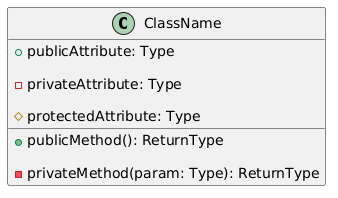
Define a class with its attributes and methods:
@startuml
class ClassName {
  + publicAttribute: Type
  - privateAttribute: Type
  # protectedAttribute: Type
  + publicMethod(): ReturnType
  - privateMethod(param: Type): ReturnType
}
@enduml
The result:
2. Relationships Between Classes
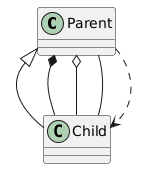
Define relationships such as inheritance, composition, etc.:
Example:
@startuml
class Parent
class Child
Parent <|-- Child : Inheritance
Parent *-- Child : Composition
Parent o-- Child : Aggregation
Parent -- Child : Association
Parent ..> Child : Dependency
@enduml
The result:
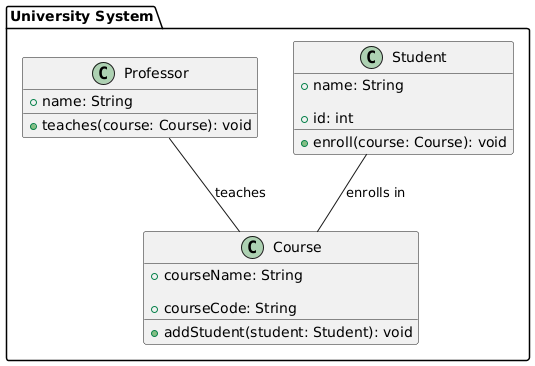
Example: Full Class Diagram
@startuml
package "University System" {
  class Student {
    + name: String
    + id: int
    + enroll(course: Course): void
  }
  class Course {
    + courseName: String
    + courseCode: String
    + addStudent(student: Student): void
  }
  class Professor {
    + name: String
    + teaches(course: Course): void
  }
  Student -- Course : "enrolls in"
  Professor -- Course : "teaches"
}
@enduml
The result: